trunk TESLA MODEL X 2019 User Guide
[x] Cancel search | Manufacturer: TESLA, Model Year: 2019, Model line: MODEL X, Model: TESLA MODEL X 2019Pages: 224, PDF Size: 5.17 MB
Page 166 of 224
If the charge port light turns red while
charging, a fault is detected. Check the instrument panel or touchscreen for a
message describing the fault. A fault can
occur due to something as common as a power outage. If a power outage occurs,
charging resumes automatically when power
is restored.
Note: When charging, particularly at high
currents, the refrigerant compressor and fan
operate as needed to keep the Battery cool.
Therefore, it is normal to hear sounds during charging.
Note: Air conditioning performance is
generally not affected by charging. However,
under certain circumstances (for example, you
are charging at high currents during a
particularly warm day), the air coming from
the vents may not be as cool as expected and
a message displays on the instrument panel.
This is normal behavior and ensures that the Battery stays within an optimum temperature
range while charging to support longevity and
optimum performance.Warning: Never spray liquid at a high
velocity (for example, if using a pressure
washer) towards the charge port while
charging. Failure to follow these
instructions can result in serious injury or
damage to the vehicle, charging
equipment, or property.
Stopping Charging
Stop charging at any time by disconnecting
the charge cable or touching Stop Charging
on the touchscreen.
Note: To prevent unauthorized unplugging of
the charge cable, the charge cable latch remains locked and Model X must be unlockedor able to recognize your key before you can
disconnect the charge cable.
To disconnect the charge cable:
1. Press and hold the button on the
connector handle to release the latch.
Alternatively, unlock the vehicle by
opening a door, using a key fob, or
touching Stop Charging on the
touchscreen. These methods unlock the
charge port as well.
2. Pull the connector from the charge port.
3. Push the charge port door closed.
Note: If Model X is equipped with a motorized
charge port door, it automatically closes shortly after you remove the charge cable.
Caution: Tesla strongly recommends
leaving Model X plugged in when not in use. This maintains the Battery at the
optimum level of charge.
Manually Releasing Charge Cable
If the usual methods for releasing a charge
cable from the charge port (using the charge
handle release button, touchscreen, or mobile
app) do not work, carefully follow these steps:
1. Ensure that Model X is not actively
charging by displaying the charging
screen on the touchscreen. If necessary,
touch Stop Charging .
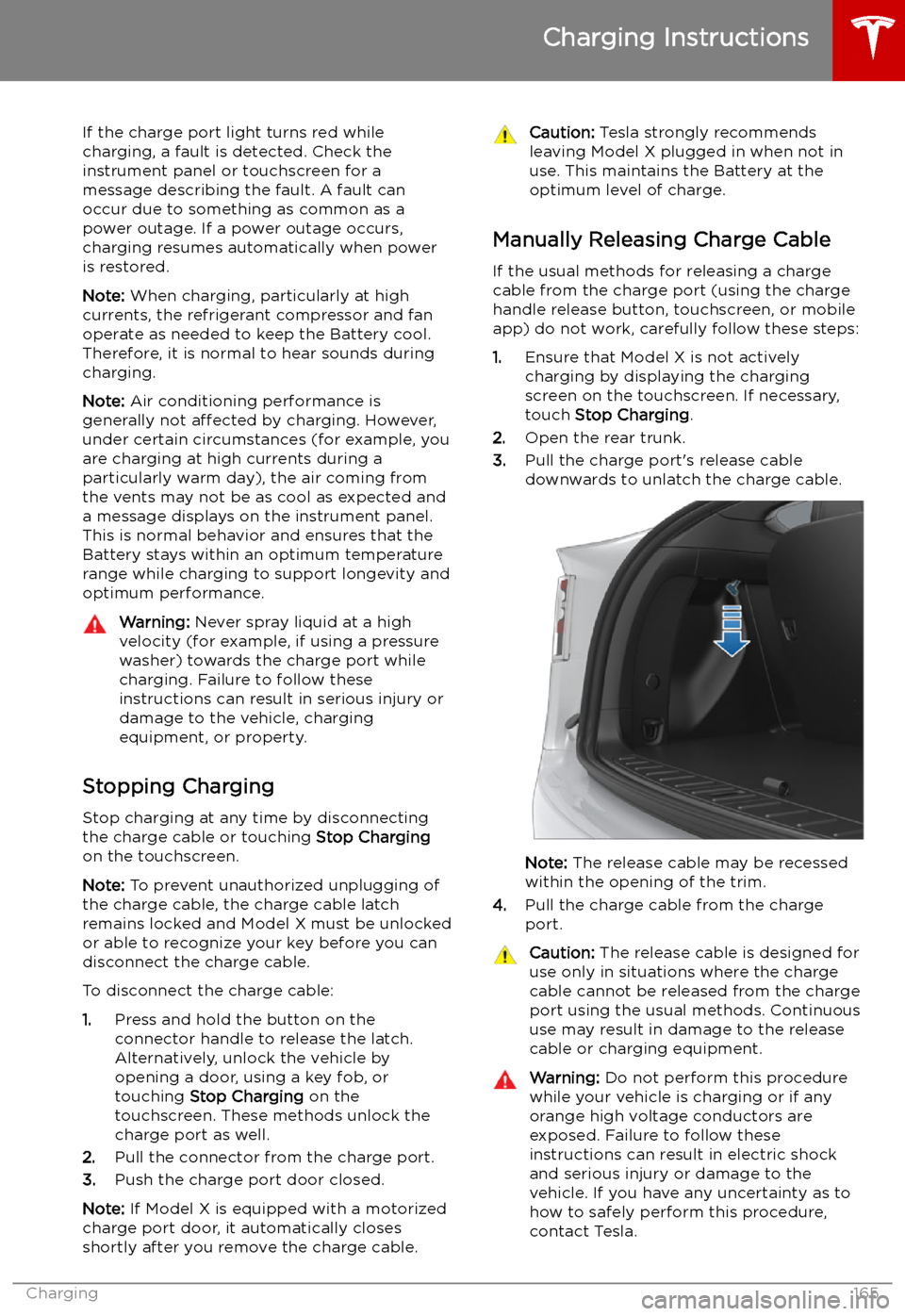
2. Open the rear trunk.
3. Pull the charge port
Page 191 of 224

The cargo weight should be distributed
between the front and rear trunks.Caution: Never load more than 80 kg on
the rear load
Page 193 of 224

Shoulder RoomFrontRear
Third60.7 in 56.8 in 40 in1542 mm
1442 mm 1016 mmHip RoomFront Rear
Third55.6 in 59 in
38.5 in1412 mm
1498 mm 978 mm
Cargo Volume
Front TrunkRear*TotalSeven Seat Vehicles6.6 cu ft (187 L)76.5 cu ft (2166 L)**83.1 cu ft (2353 L)Six Seat Vehicles6.6 cu ft (187 L)70.7 cu ft (2002 L)**77.3 cu ft (2189 L)Five Seat Vehicles6.6 cu ft (187 L)81.2 cu ft (2299.5 L)**87.8 cu ft (2486.5 L)* Maximum cargo volume behind the front row seats. Includes the 12.6 cu ft (357 L) cargo area
in the rear trunk (area behind the third row seats, if equipped).** Second row seats fully forward and/or folded.
Weights
Curb Weight* 75D2,427 kgCurb Weight* 100D2,533 kgCurb Weight* P100D2,572 kgGVWR** 75D2,985 kgGVWR** 100D3,079 kgGVWR** P100D3,120 kgGross Vehicle Weight Distribution 75DFront: 1,311 kg
Rear: 1,674 kgGross Vehicle Weight Distribution 100DFront: 1,405 kg Rear: 1,674 kgGross Vehicle Weight Distribution P100DFront: 1,373 kgRear: 1,747 kgGross Axle Weight Rating - Front1,470 kgGross Axle Weight Rating - Rear (at nominal tire
pressure of 290 kPa)1,800 kgTowing Capacity (if equipped)See Towing and Accessories on page
87.
Dimensions and Weights
192Model X Owner
Page 222 of 224

specifications (continued)motor 194
subsystems 194
tires 198
wheels 197
speed assist 122
Speed Limit Mode 132
speed limit warning 122
spoiler 86
Sport acceleration 79
stability control 75
Standard acceleration 79
starting 58
Statutory Plate 189
steering specifications 195
steering wheeladjusting position 53
adjusting sensitivity 53
buttons 53
heated 53
scroll buttons 53
steering, automatic
106
streaming services 146
summer tires 177
Summon 115
Summon Distance 115
sun visors 25
superchargingdescribed 169
idle fees 169
pay-per-use fees 169
suspension (air), settings for 150
suspension specifications 196
T telematics 210
temperatureBattery (high voltage), limits 162
cabin, controls for 134
heated steering wheel 55
outside 65
Teslacam 85
third row seats, folding and raising 30
tie-down straps 206
Tilt/Intrusion detection 153
Tire and Loading Information label 189
tire noise 177
Tire Pressure Monitoring SystemFCC certification 213
overview of 176
tire pressures, checking 172
tire pressures, when towing 89
tiresall-season 177
balancing 173
chains 177
inspecting and maintaining 173tires (continued)pressures, how to check 172
replacing 174
replacing a tire sensor 176
rotation 173
specification 198
summer 177
tire markings 199
winter 177
toll system transponders, attaching 186
torque specifications 194
touch up body 181
touchscreenclean mode 180
cleaning 180
overview 4
software updates 158
tow eye, locating 205
tow hitch, connecting 93
tow hitch, disconnecting 95
towing 205
towing a trailer 87
towing capacity 88
towing guidelines 92
towing instructions 204
Towing Label 188
TPMSFCC certification 213
overview of 176
Tracking Disabled 140
traction control 75
trademarks 209
Traffic-Aware Cruise Control 100
Trailer Brakes for towing 90
Trailer Mode 90
trailer, towing 87
transmission specifications 195
transponders, attaching 186
Transport Mode 205
transporting 204, 205
trip chart 82
trip meter 81
Trip Planner 143
trunk, front 20
trunk, rearchild-protection lock 15
disabling interior handle 15
TuneIn radio 146
turn signals 64
U ultrasonic sensors 97
Unlock on Park 9
unlocking when key doesn